
Software Licence Reconciliation Agent · Use case
How can we use an AI agent to compare the software licences we bought with those in use on our own infrastructure?
A software licence reconciliation agent compares the licences your company has bought with the licences assigned and in use, product by product, and lists the shortfalls and the unused ones, each with the record it comes from. The licence manager decides what to buy, move or release. The agent buys nothing, assigns and removes no licence and changes no record. It runs on your own infrastructure, so licence statements and usage records are not sent to a public AI service.
Licences are bought in one place.
They are assigned and used in another.
- ✗ 01What was bought sits in a supplier's statement and a contract, what is assigned sits in the directory, and what is used sits in a usage report, and nobody sets the three side by side until a renewal or a supplier's audit.
- ✗ 02Licence statements carry prices and terms, and usage records name staff.
Where it stops for a person
Always. The licence manager decides what to buy, move or release.Always. The licence manager decides what to buy, move or release. The agent compares counts, it does not interpret a licence agreement: where the terms that decide how a licence is counted are unclear, it says so and the licence manager or the contract owner reads them. Its list is a working paper, not the company's statement to a supplier. An unused licence is listed with its record so that it can be released, and the agent draws no conclusion about a member of staff.
It lists the shortfalls and the unused.
The licence manager decides.
Step · 01
The licence manager uploads the supplier's licence statement and the usage export, or names the period.
Step · 02
The agent reads what was bought, product by product, and what is assigned and in use.
Step · 03
It compares the three counts for each product.
Step · 04
It lists each shortfall and each unused or unassigned licence, with the record behind it, and marks any product it could not match.
Step · 05
The licence manager checks the list and decides what to buy, move or release, and a person makes each change in your own system.
What a licence manager sees
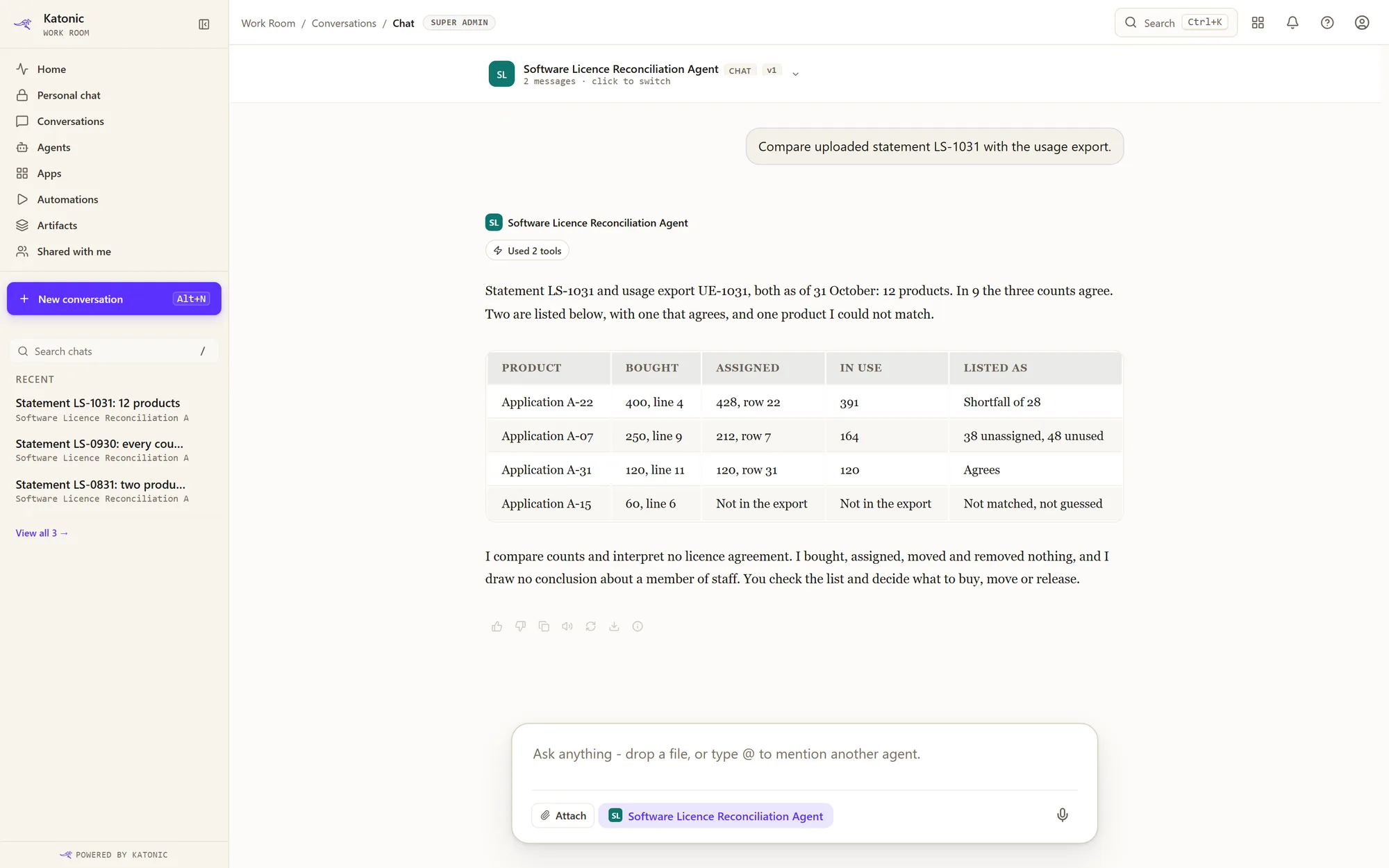
Tap the screen to open it at full size.
Reads from · connectors
 Your own APIs
The supplier's licence statement and the usage export, as uploaded files; or the licence, assignment and usage records, read through your own APIs with the read operations only. The catalogue has no asset or licence connector, so you give Katonic the description of the interface you run.
What it can change
Nothing. It compares and lists. It buys, assigns, moves and removes no licence, and changes no record and no account.
Your people ask it.
It replies in the same conversation.
Katonic calls this a conversational agent.
01 · Where your people use it
In Work Room
Your people find it in Work Room, under Agents. They ask in plain words, and it replies in the same conversation.
See Work Room →02 · Where they already work
In a screen they already use
Your developers can put it behind a screen your people already work in, so nobody has to open a new tool.
03 · With other agents
As a helper to another agent
A broader agent can call it for this one job and use its answer.
For your IT team. It can also be called through the REST API, and reached from other AI tools through the Katonic MCP Server. An action that is held for approval still waits for a person, however the agent is called.Public API →MCP Server →
What you set up
- Decide which products are compared, and where the bought, assigned and used counts for each come from.
- Have the licence manager upload the statements and exports, or import the description of the API that holds them, keeping only the operations that read.
- Build the agent in Katonic Studio and test it on a product your team has already reconciled by hand.
- Publish it to the licence manager first, one supplier's products at a time.
Where it runs
The agent, its knowledge store and the model run on infrastructure you own or control. You choose the model and serve it yourself, so questions, documents and answers are not sent to a public AI service. Licence statements, with their prices, and usage records stay inside the company.
How you get it today
You build it in Katonic Studio: describe the job, connect what is named above, add test cases and release the agent once it passes them. There is no ready-made template for this job yet.
Does the agent remove an unused licence from a user?
No. It has no tool that changes an account or a licence. It lists the licence with its record, and the licence manager decides.
Is its list our licence position for a supplier's audit?
No. It is a working paper for the licence manager, who checks it against the agreement and answers for what the company tells a supplier.
Where are licence records processed?
On your own infrastructure, with a model you serve. Nothing is sent to a public AI service.