
Languages
One platform, in the language your people work in.
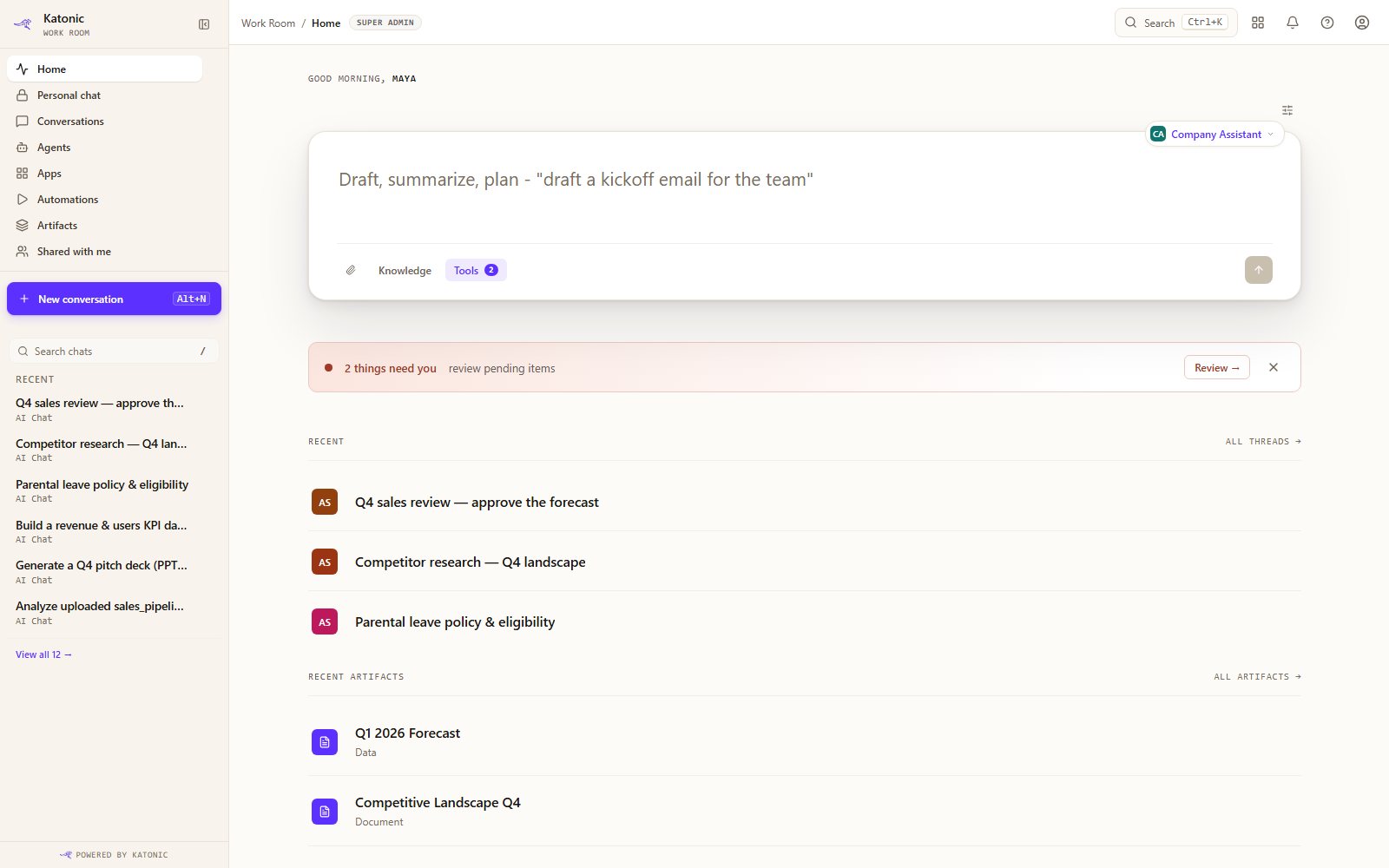
Katonic runs in 17 languages, with Arabic and Urdu laid out right to left. Each person chooses their own language, and an administrator sets the default for the organization.
English Left to right
العربية Arabic, right to left
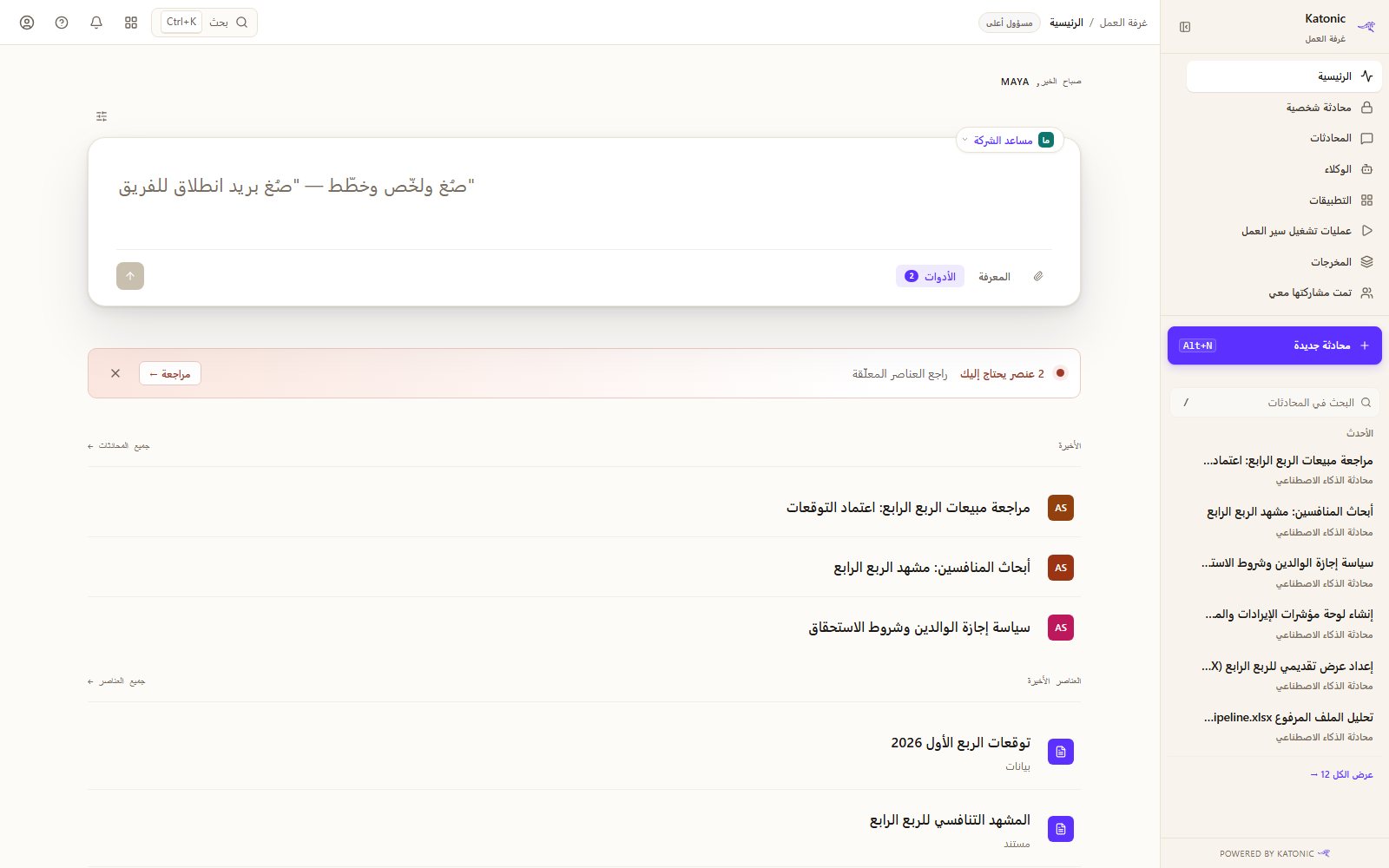
The same Work Room screen in English and in Arabic. The Arabic screen is mirrored: menus on the right, text aligned right. Screens are from the product, with sample data.
The languages
17 languages, each a choice in the picker.
A person changes language from their profile, and the whole product follows at once. Two people in the same team can work side by side in different languages.
English
English
العربية
Arabic
Right to left
Français
French
Español
Spanish
Deutsch
German
简体中文
Chinese, Simplified
繁體中文
Chinese, Traditional
日本語
Japanese
한국어
Korean
हिन्दी
Hindi
Português (Brasil)
Portuguese, Brazil
Türkçe
Turkish
Српски
Serbian
Bahasa Indonesia
Indonesian
Bahasa Melayu
Malay
Filipino
Filipino
اردو
Urdu
Right to left
Your own
Add a language
Watch
All 17, in 48 seconds.
Work Room in every language, the switch to right to left, then Studio and Control Room.
See it
The same screen, in every language.
Pick a language and a screen. These are the three places people spend their day: Work Room for everyone, Studio for the teams who build, Control Room for administrators.
Work Room in Arabic. Where people ask, hand over work and pick up results.
Screens are from the product, with sample data.
What follows the language
More than translated labels.
Menus, buttons and messages
Every place a person works: Work Room, Studio and Control Room, including errors and confirmations.
Direction
Arabic and Urdu mirror the whole layout. The menu moves to the right, text aligns right, and arrows point the other way.
Dates, numbers and money
Dates, times, large numbers and currency amounts follow the conventions of the chosen language.
Counting
Each language keeps its own plural rules, so "1 item", "2 items" and "11 items" read correctly where a language has more than two forms.
How it is chosen
The person decides. The organization sets the default.
The product looks for a language in this order and uses the first one it finds.
The person’s own choice. Set once in the profile, and remembered.
The organization’s default. Set by an administrator for everyone who has not chosen.
The browser’s language. Used when neither of the first two is set.
English. When the browser asks for a language the product does not carry.
Your own language and wording
Add a language. Or change our words for yours.
Administrators manage languages from Control Room, without a new release from Katonic.
The language files ship inside the product. They work on your own infrastructure with no internet connection.
Add a language that is not on the list. Upload a language file and it appears in the picker.
Change the wording. Replace any label with the term your organization uses.
Check before you publish. See how much of the product a language covers, and preview the product in it.
Choose what people see. Show or hide a language for the whole organization.
Questions
What buyers ask about languages.
Which languages does the Katonic platform support?
The Katonic interface runs in 17 languages: English, Arabic, French, Spanish, German, Chinese (Simplified), Chinese (Traditional), Japanese, Korean, Hindi, Portuguese (Brazil), Turkish, Serbian, Indonesian, Malay, Filipino, Urdu.
Does Katonic support Arabic and other right-to-left languages?
Yes. Arabic and Urdu are laid out right to left. The whole layout is mirrored: the menu sits on the right, text aligns right and arrows are reversed.
Can people in the same organization use different languages?
Yes. Each person chooses their own language in their profile. An administrator sets the default for people who have not chosen.
Can we add a language that is not on the list?
Yes. An administrator uploads a language file from Control Room and the language appears in the picker. The same screen is used to replace any label with your own wording.
Do the languages work on our own infrastructure, without internet?
Yes. The language files ship inside the product, so every language works on your own infrastructure, including a site with no internet connection.
Do agents answer in my language?
The language of the interface and the language of an answer are separate. An agent answers in the language you write in, as far as the model you have chosen supports that language.