
Business Onboarding Agent · Use case
How can a bank use an AI agent to prepare a company's account-opening file on its own infrastructure?
A business onboarding agent takes a company's application with its documents. It reads the registry extract and the constitutional documents, draws the ownership chain down to the people behind it, lists every director and owner of 25 percent or more for screening, and prepares the account-opening file as a draft. A member of staff approves or declines every account.
Who owns the company?
The answer is spread over five documents.
- ✗ 01To open a business account someone reads the registry extract, the articles and the ownership declaration, and works out who owns and controls the company.
- ✗ 02An owner that is itself a company, with no document behind it, is a gap. It is easy to miss and it cannot be guessed.
Where it stops for a person
Always, before an account is opened.A member of staff approves or declines every account. The agent never names an owner that no document shows, and it tells the applicant nothing.
It draws the ownership chain.
An officer approves the account.
Step · 01
A company's application arrives with its documents. Your onboarding system announces it, or an officer names it.
Step · 02
The agent checks the registry extract: its date, and that the name, number and address agree with the form.
Step · 03
It draws the ownership chain: each owner, the share, the country and the document that shows it. Every gap is listed as a gap.
Step · 04
It lists every director and every owner of 25 percent or more, and asks your screening service about each of them and the company.
Step · 05
It saves the file as a draft, each item marked agrees, differs, missing or needs a person.
What a member of the onboarding team sees
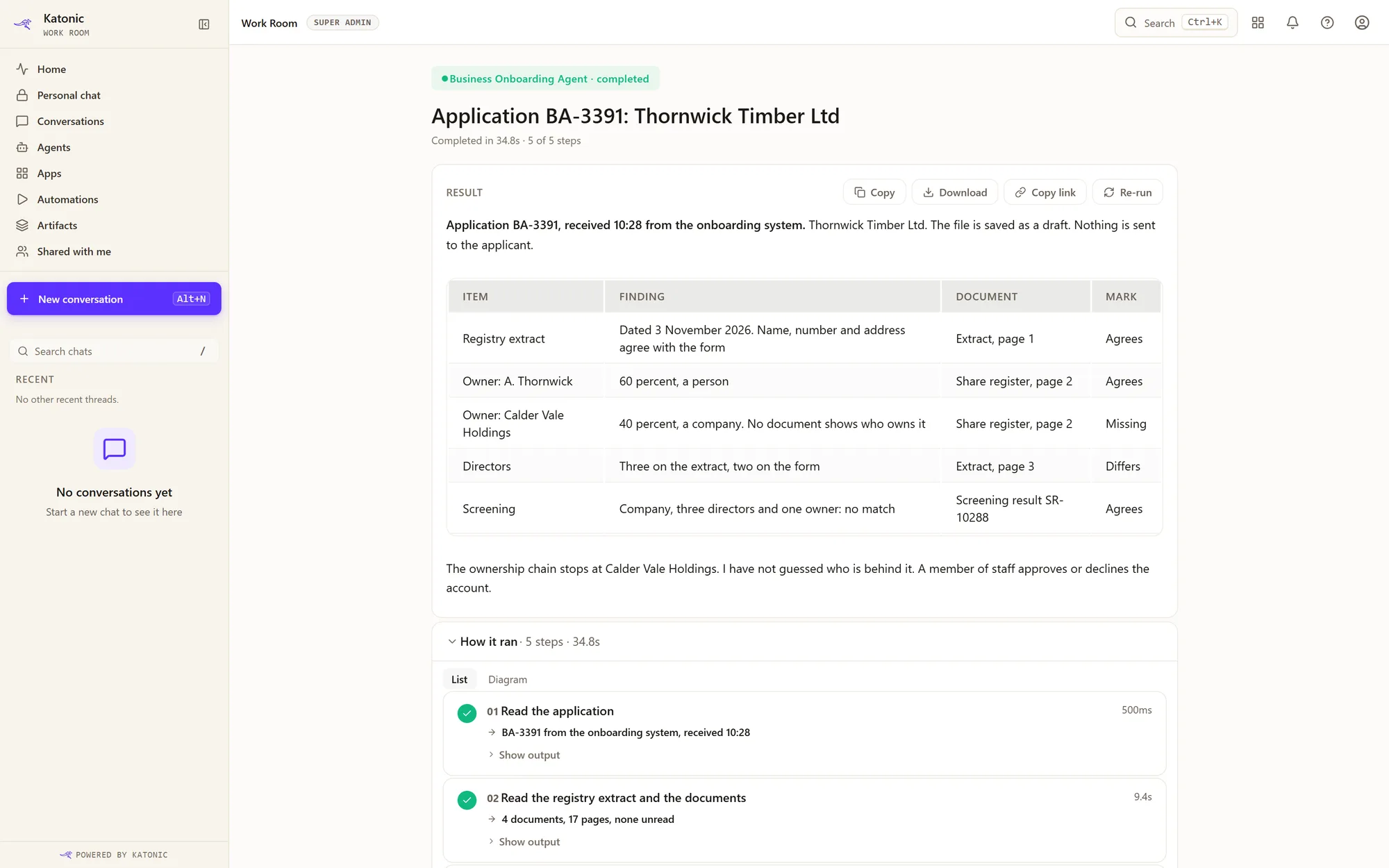
Tap the screen to open it at full size.
Reads from · connectors
 Your own APIs
Your onboarding system, for the application, its documents and the account-opening requirements. Your screening service. Each through its own API.
Acts through · your own APIs
One operation that saves the draft file.
Nobody has to ask.
It starts when something arrives.
Katonic calls this an event-triggered agent, one kind of workflow agent: it starts when something happens in a system, such as an email arriving, a file landing or a record changing.
What is an event-triggered agent? →The four types of agent →
01 · How it starts
When something arrives
Another system tells it that something has happened, and it starts by itself. Nobody has to watch a queue.
02 · Where your people see it
In Work Room, under Automations
Each run appears in Work Room under Automations. A run that needs a decision waits there for a person.
See Work Room →03 · Where they already work
In a screen they already use
Your developers can put it behind a screen your people already work in, so nobody has to open a new tool.
For your IT team. Another system can start a run through the REST API or a webhook. An action that is held for approval still waits for a person, however the run was started.Public API →
What you set up
- Import the API descriptions of the onboarding system and the screening service.
- Give the agent your account-opening requirements for a company.
- Test it on applications with a known gap in the ownership chain.
Where it runs
The agent, its knowledge store and the model run on infrastructure you own or control. You choose the model and serve it yourself, so questions, documents and answers are not sent to a public AI service. Company documents and the identities of directors and owners stay inside the bank.
How you get it today
You build it in Katonic Studio: describe the job, connect what is named above, add test cases and release the agent once it passes them. There is no ready-made template for this job yet.
What does it do when an owner is another company?
It follows the documents down the chain. Where no document shows who owns that company, it lists the gap, says what is missing and stops there.
Does it screen the directors itself?
It asks the screening service you already use and reports what that service returns.
Does it open the account?
No. It prepares the file. A member of staff approves or declines.