
Mainframe Modernisation Agent · Use case
How can a bank use an AI agent to convert legacy programs in reviewed stages on its own infrastructure?
A mainframe modernisation agent converts a program of the bank's old system in four fixed stages: it writes down what the program does as numbered rules, writes tests from those rules, writes the converted code, and checks the code against the tests. An engineer reviews every stage and nothing is deployed. Old behaviour that looks like a bug is kept and flagged, never fixed silently.
Shelves of old programs.
Each one has rules nobody wrote down.
- ✗ 01A conversion that tidies an odd rounding rule on the way changes what the bank pays or charges.
- ✗ 02Source code of a core system cannot be sent to a public AI service.
Where it stops for a person
At every stage. An engineer reviews before anything is used.An engineer reviews every stage. The agent deploys, installs and schedules nothing, and never calls converted code ready for production.
It converts in four stages.
An engineer reviews each one.
Step · 01
An engineer names a program, or a batch of programs.
Step · 02
Stage one: the agent reads the program and writes what it does as numbered rules, each with the line it came from.
Step · 03
Stage two: it writes tests from the rules, using the old system's own sample rows, with each expected result worked out.
Step · 04
Stage three: it writes the converted code, keeping every rounding rule, date form and special code.
Step · 05
Stage four: it checks the code against the tests and lists every difference, and lists each old behaviour it kept and flagged.
What an engineer sees
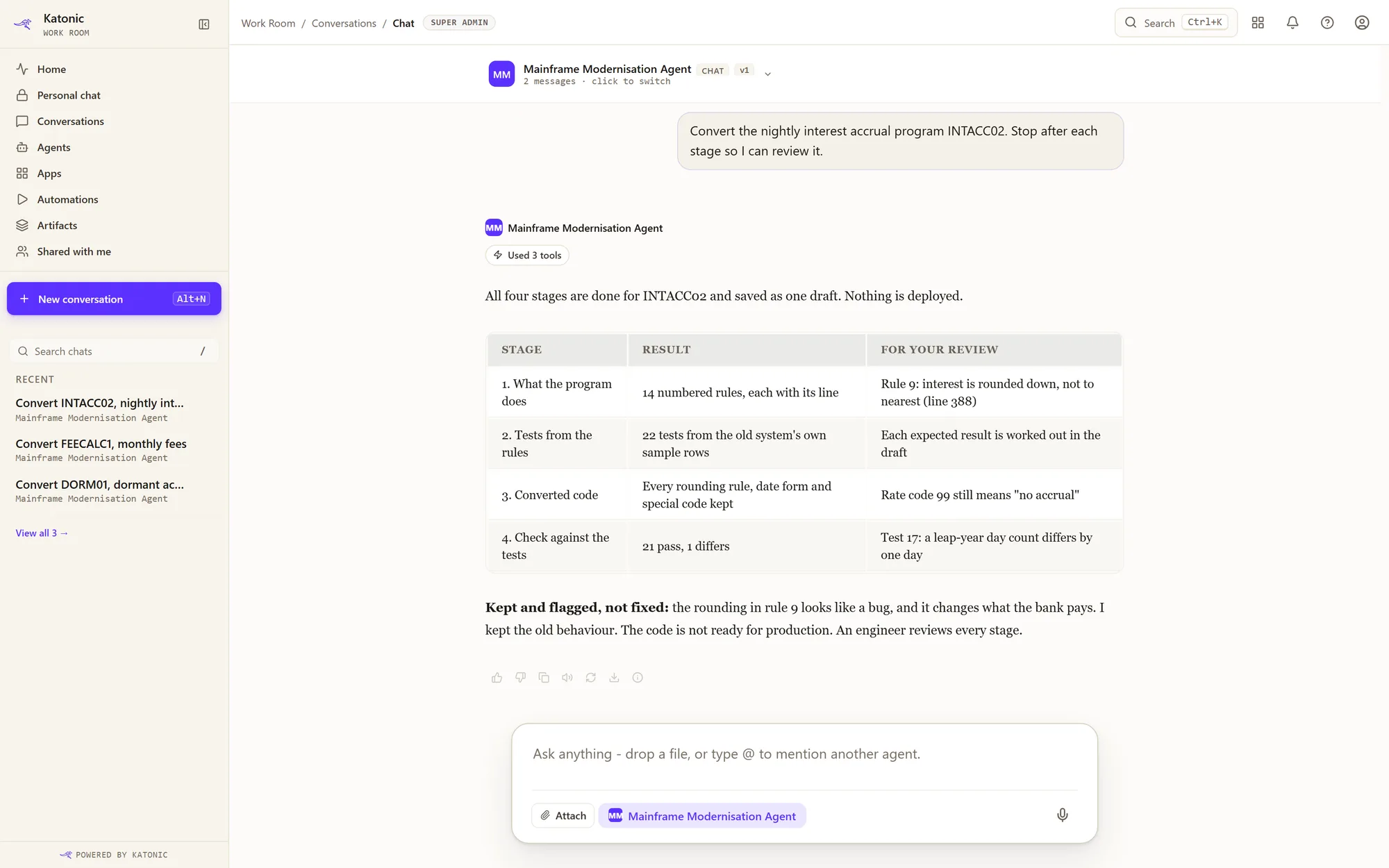
Tap the screen to open it at full size.
Reads from · connectors
 Your own APIs
The old system's programs, tables with sample rows and stored procedures. Through an API or a database connection that can only read.
Acts through · your own APIs
One operation that saves a draft for each program.
Your people hand it a job.
It acts once a person approves.
Katonic calls this an acting agent, one kind of conversational agent: it carries out a request through the tools it has been given, and anything that changes a record waits for a person.
01 · Where your people use it
In Work Room
Your people find it in Work Room, under Agents, and hand it the job in plain words. Anything that would change a record waits there for their approval.
See Work Room →02 · Where they already work
In a screen they already use
Your developers can put it behind a screen your people already work in, so nobody has to open a new tool.
03 · With other agents
As a helper to another agent
A broader agent can call it for this one job and use its answer.
For your IT team. It can also be called through the REST API, and reached from other AI tools through the Katonic MCP Server. An action that is held for approval still waits for a person, however the agent is called.Public API →MCP Server →
What you set up
- Connect the old system's source and catalog with a user that can only read.
- Name the language to convert to.
- Start with a program your engineers know well.
Where it runs
The agent, its knowledge store and the model run on infrastructure you own or control. You choose the model and serve it yourself, so questions, documents and answers are not sent to a public AI service. The source code stays inside the bank.
How you get it today
You build it in Katonic Studio: describe the job, connect what is named above, add test cases and release the agent once it passes them. There is no ready-made template for this job yet.
What does it do with old behaviour that looks like a bug?
It keeps the behaviour and lists it under kept and flagged, with the line and what the code does. An engineer decides.
Does it run the tests?
Only if you give it a way to run code. Otherwise each check is made by reading, and the draft says so. It never says the tests pass unless it ran them.
Does it deploy the new code?
No. It saves a draft for review.