
Credential Reset Request Check Agent · Use case
How can we use an AI agent to check a reset request against our own procedure on our own infrastructure?
A credential reset request check agent reads one request to reset a password or a sign-in factor, finds the identity checks your own procedure requires for that kind of request, and lists each one with whether the ticket shows it was done. A service desk analyst verifies the person and carries out the reset. The agent verifies nobody, resets nothing and approves nothing. It runs on your own infrastructure, so reset requests are not sent to a public AI service.
A caller asks for a reset.
The procedure is long and the queue is waiting.
- ✗ 01A request to reset a password or a sign-in factor is the request a service desk handles most carefully, because the caller may not be who they say they are.
- ✗ 02The procedure differs by kind of account and kind of request, and the analyst has it in mind, not in front of them.
Where it stops for a person
Always. An analyst verifies the person and carries out the reset.Always. A service desk analyst verifies the person and carries out the reset. The agent verifies nobody: it cannot tell who a caller is, and it does not say that a caller is who they claim to be. A list on which every check is on record is not an approval. It says what the ticket records, and the analyst answers for whether each check was really done. Where your procedure asks for a second person on a kind of request, the agent says so and that person acts.
It lists the checks and what is on record.
An analyst verifies and resets.
Step · 01
A reset request arrives as a ticket, or an analyst opens one after a call.
Step · 02
The agent reads the ticket: whose account, which kind of reset, and how the request arrived.
Step · 03
It finds the identity checks your reset procedure requires for that kind of account and request.
Step · 04
It lists each check with whether the ticket shows it was done, and marks the ones not on record.
Step · 05
A service desk analyst carries out the checks, verifies the person, records what was done and carries out the reset in your own system.
What a service desk analyst sees
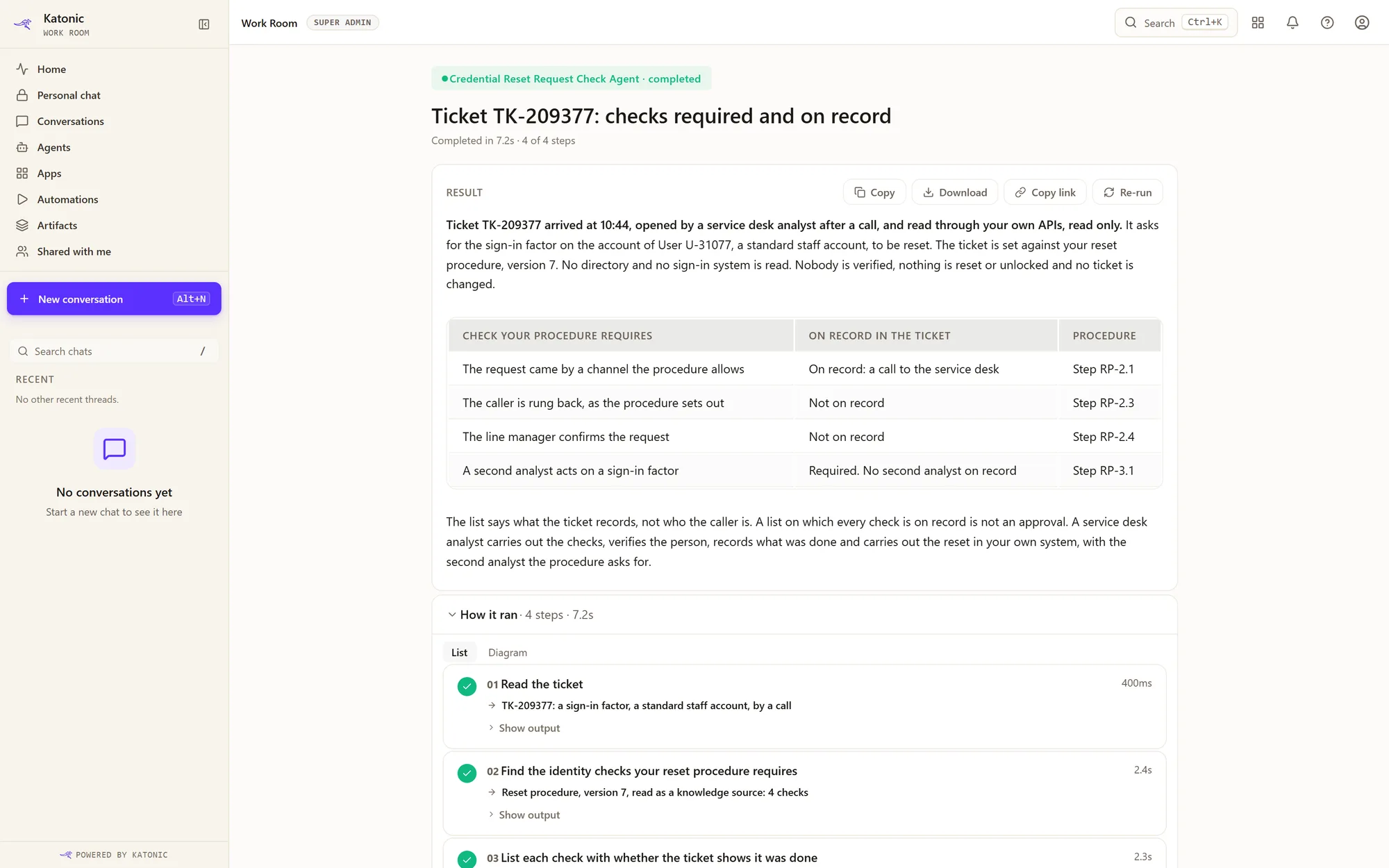
Tap the screen to open it at full size.
Reads from · connectors
 Your own APIs
The request ticket, read through a server from the catalogue, through your own APIs with the operations that change something left out, or as an uploaded file; and your reset procedure, indexed as a knowledge source. It reads no directory and no sign-in system.
What it can change
Nothing. It lists the checks and what is on record. It resets no password and no sign-in factor, unlocks no account, and changes no ticket.
Nobody has to ask.
It starts when something arrives.
Katonic calls this an event-triggered agent, one kind of workflow agent: it starts when something happens in a system, such as an email arriving, a file landing or a record changing.
What is an event-triggered agent? →The four types of agent →
01 · How it starts
When something arrives
Another system tells it that something has happened, and it starts by itself. Nobody has to watch a queue.
02 · Where your people see it
In Work Room, under Automations
Each run appears in Work Room under Automations. A run that needs a decision waits there for a person.
See Work Room →03 · Where they already work
In a screen they already use
Your developers can put it behind a screen your people already work in, so nobody has to open a new tool.
For your IT team. Another system can start a run through the REST API or a webhook. An action that is held for approval still waits for a person, however the run was started.Public API →
What you set up
- Write down the identity checks your procedure requires for each kind of account and each kind of reset.
- Index the reset procedure as a knowledge source, and connect the ticket system, keeping only the operations that read.
- Build the agent in Katonic Studio and test it on past reset requests, including ones the desk refused.
- Publish it to service desk analysts only, one kind of reset first.
Where it runs
The agent, its knowledge store and the model run on infrastructure you own or control. You choose the model and serve it yourself, so questions, documents and answers are not sent to a public AI service. Reset requests and the procedure that guards them stay inside the company.
How you get it today
You build it in Katonic Studio: describe the job, connect what is named above, add test cases and release the agent once it passes them. There is no ready-made template for this job yet.
Does the agent verify the person who asks for the reset?
No. It verifies nobody. It lists the identity checks your procedure requires and whether each is on record. A service desk analyst verifies the person.
Does it reset the password or the sign-in factor?
No. It has no tool that resets or changes anything. A service desk analyst carries out the reset after the checks.
If every check is on record, does the reset go ahead?
Not on the agent's word. The list says what the ticket records. The analyst answers for the checks and decides whether to carry out the reset.