
Audit Evidence Agent · Use case
How can a bank use an AI agent to collect the evidence for a control test on its own infrastructure?
An audit evidence agent takes a control test and its evidence plan. It finds each record the plan names, among tickets, change records, access reviews and recovery tests, and lists what it found, what is missing and the exceptions the records show, each with its record id. It gives no conclusion: the auditor concludes whether the control works.
The test plan names the evidence.
Someone has to go and find it.
- ✗ 01For each control test an auditor asks several teams for records, waits, and checks that each one falls inside the period.
- ✗ 02Time spent collecting evidence is time not spent judging it.
Where it stops for a person
Always. The auditor concludes and decides whether an exception matters.The auditor reads the pack and concludes. The agent does not mark a test passed or failed, and it does not count a record from another period as evidence.
It collects and lists.
The auditor concludes.
Step · 01
On a clock, each audit cycle, the agent works through the open control tests. It can also be asked for one test.
Step · 02
It reads the test: the policy clause, the objective, the period and the numbered evidence plan.
Step · 03
For each item it finds the record the plan names and cites its id, or lists the item as missing with what it searched.
Step · 04
It lists the exceptions the records show, such as a change with no approver or a recovery test older than the period.
Step · 05
It saves the pack as a draft. The pack goes to the auditor.
What an auditor sees
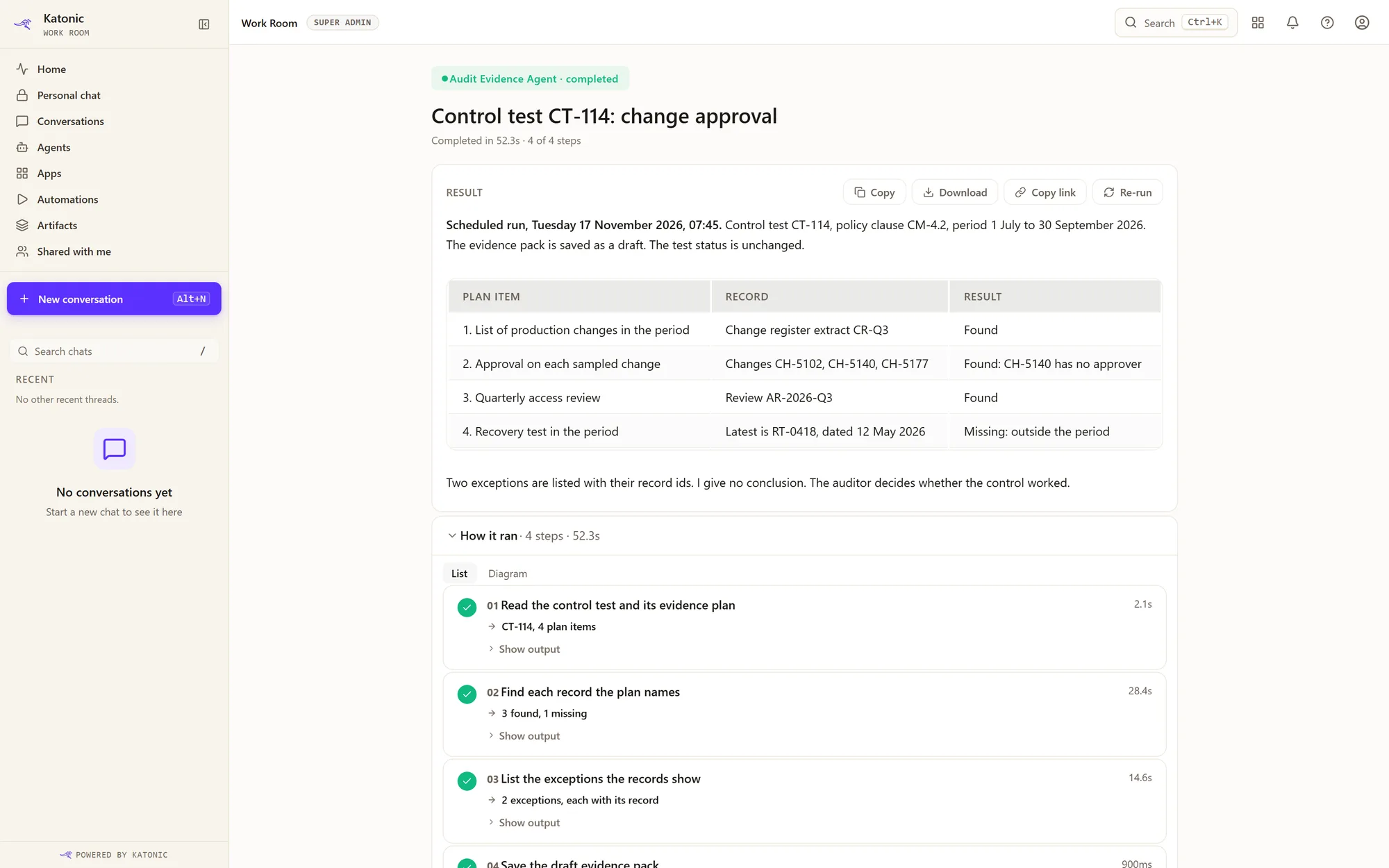
Tap the screen to open it at full size.
Reads from · connectors
 Your own APIs
The systems that hold your control tests, tickets, change records, access reviews and recovery tests, each through its own API.
Acts through · your own APIs
One operation that saves the draft evidence pack.
Nobody has to ask.
It runs at the times you set.
Katonic calls this a scheduled agent, one kind of workflow agent: it runs at set times, or over a batch of items, and produces the same kind of output each run.
01 · How it starts
On a timetable
It runs at the times you set. A person can also start a run from Work Room.
02 · Where your people see it
In Work Room, under Automations
Each run appears in Work Room under Automations. A run that needs a decision waits there for a person.
See Work Room →03 · Where they already work
In a screen they already use
Your developers can put it behind a screen your people already work in, so nobody has to open a new tool.
For your IT team. Another system can start a run through the REST API or a webhook. An action that is held for approval still waits for a person, however the run was started.Public API →
What you set up
- Import the API descriptions of the systems that hold the evidence.
- Write each control test with a numbered evidence plan.
- Set when the batch runs in each audit cycle.
Where it runs
The agent, its knowledge store and the model run on infrastructure you own or control. You choose the model and serve it yourself, so questions, documents and answers are not sent to a public AI service. Audit records stay inside the bank.
How you get it today
You build it in Katonic Studio: describe the job, connect what is named above, add test cases and release the agent once it passes them. There is no ready-made template for this job yet.
Does it say whether a control works?
No. It collects and lists. The auditor concludes.
What does it do when a record is missing?
It lists the item as missing and writes what it searched. If a ticket explains the gap it reports what the ticket says, without counting it as evidence.
Can it change a ticket or a test status?
No. It has no tool that changes a record.