
Client Meeting Brief Agent · Use case
How can a bank use an AI agent to brief a relationship manager before a client meeting on its own infrastructure?
A client meeting brief agent takes a relationship manager's meetings for the next day and writes one brief for each: what the client holds and owes, recent contacts, anything in progress with the bank and public news, each point with its source. It contacts no one and gives no view on the client. The relationship manager decides what to say.
A day of client meetings.
A file to read for each.
- ✗ 01Before a meeting a relationship manager opens the client's positions, the credit exposure, the contact notes and the news, each in a different system.
- ✗ 02A brief put together in a hurry misses the open complaint or the article from last week.
Where it stops for a person
The relationship manager decides what to say. Press coverage is agreed with compliance first.The relationship manager reads the brief and decides what to say. Press coverage that touches a client is agreed with compliance before the meeting.
It writes the brief.
The relationship manager decides what to say.
Step · 01
On a clock, the agent lists the next day's meetings for a relationship manager. It can also be asked for one meeting.
Step · 02
It reads the meeting, what the client holds across the bank, the bank's credit exposure, the recorded contacts and any complaint.
Step · 03
It searches the press sources the bank names and reads every article before using it, keeping out coverage of someone who only shares the client's name.
Step · 04
It writes the brief in a fixed order, from the summary to the questions to ask, with the source of every point.
Step · 05
It saves the brief as a draft for the relationship manager.
What a relationship manager sees
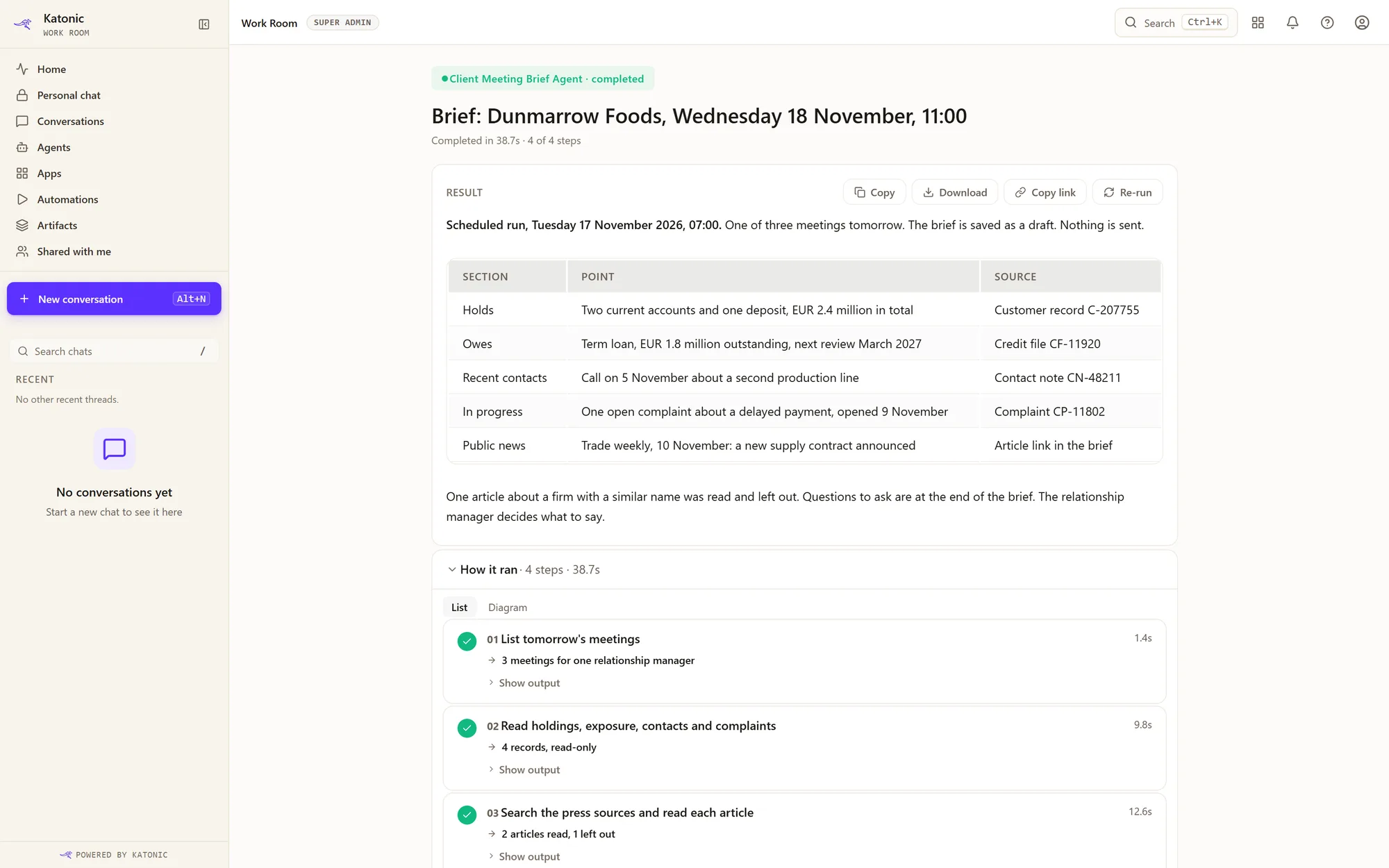
Tap the screen to open it at full size.
Reads from · connectors
 Your own APIs
Your client meetings calendar, your customer records and the press sources you name, each through its own API.
Acts through · your own APIs
One operation that saves the draft brief.
Nobody has to ask.
It runs at the times you set.
Katonic calls this a scheduled agent, one kind of workflow agent: it runs at set times, or over a batch of items, and produces the same kind of output each run.
01 · How it starts
On a timetable
It runs at the times you set. A person can also start a run from Work Room.
02 · Where your people see it
In Work Room, under Automations
Each run appears in Work Room under Automations. A run that needs a decision waits there for a person.
See Work Room →03 · Where they already work
In a screen they already use
Your developers can put it behind a screen your people already work in, so nobody has to open a new tool.
For your IT team. Another system can start a run through the REST API or a webhook. An action that is held for approval still waits for a person, however the run was started.Public API →
What you set up
- Import the API descriptions of the calendar, the customer records and the press source.
- Agree the order and the sections of the brief.
- Set the time the batch runs each day.
Where it runs
The agent, its knowledge store and the model run on infrastructure you own or control. You choose the model and serve it yourself, so questions, documents and answers are not sent to a public AI service. Client positions and contact notes stay inside the bank.
How you get it today
You build it in Katonic Studio: describe the job, connect what is named above, add test cases and release the agent once it passes them. There is no ready-made template for this job yet.
Does it contact the client?
No. It writes a draft for the relationship manager and sends nothing.
Does it say whether the bank should lend more to the client?
No. It sets out the position and gives no view on lending to, keeping or leaving a client.
Can one manager see another manager's brief?
The agent briefs only the meetings of the manager it is given.