
Post-Incident Review Agent · Use case
How can a bank use an AI agent to draft the review of a closed IT incident on its own infrastructure?
A post-incident review agent is given a closed incident. It plans its own investigation across the IT operations records, lets each answer decide the next read, and stops when the records support one root cause or show that they cannot settle it. It drafts the review in a fixed order and names no person as the cause. A person assigns every owner and date, and approves the review.
The incident is closed.
The review is due, and nobody has the time.
- ✗ 01A review written weeks later, from memory, repeats the first assumed cause from the night of the incident.
- ✗ 02Where the records do not settle the cause, a review that says so is worth more than one that picks.
Where it stops for a person
Always. A person assigns owners and dates and approves the review.A person assigns every owner and every date, decides what the review finally says and approves it. The agent reviews no open incident.
It investigates and drafts.
The incident manager approves.
Step · 01
A person chooses a closed incident.
Step · 02
The agent plans what to read: the incident, its timeline, the metrics, the changes and the runbooks.
Step · 03
It tests the first assumed cause against the metrics and the later entries, and notes a change record that was corrected after the event.
Step · 04
It writes the review: root cause, timeline with sources, contributing factors, what went well, what did not, proposed actions and what is not known.
Step · 05
It saves the review once as a draft, with the owner and the date of every action left empty.
What a problem manager sees
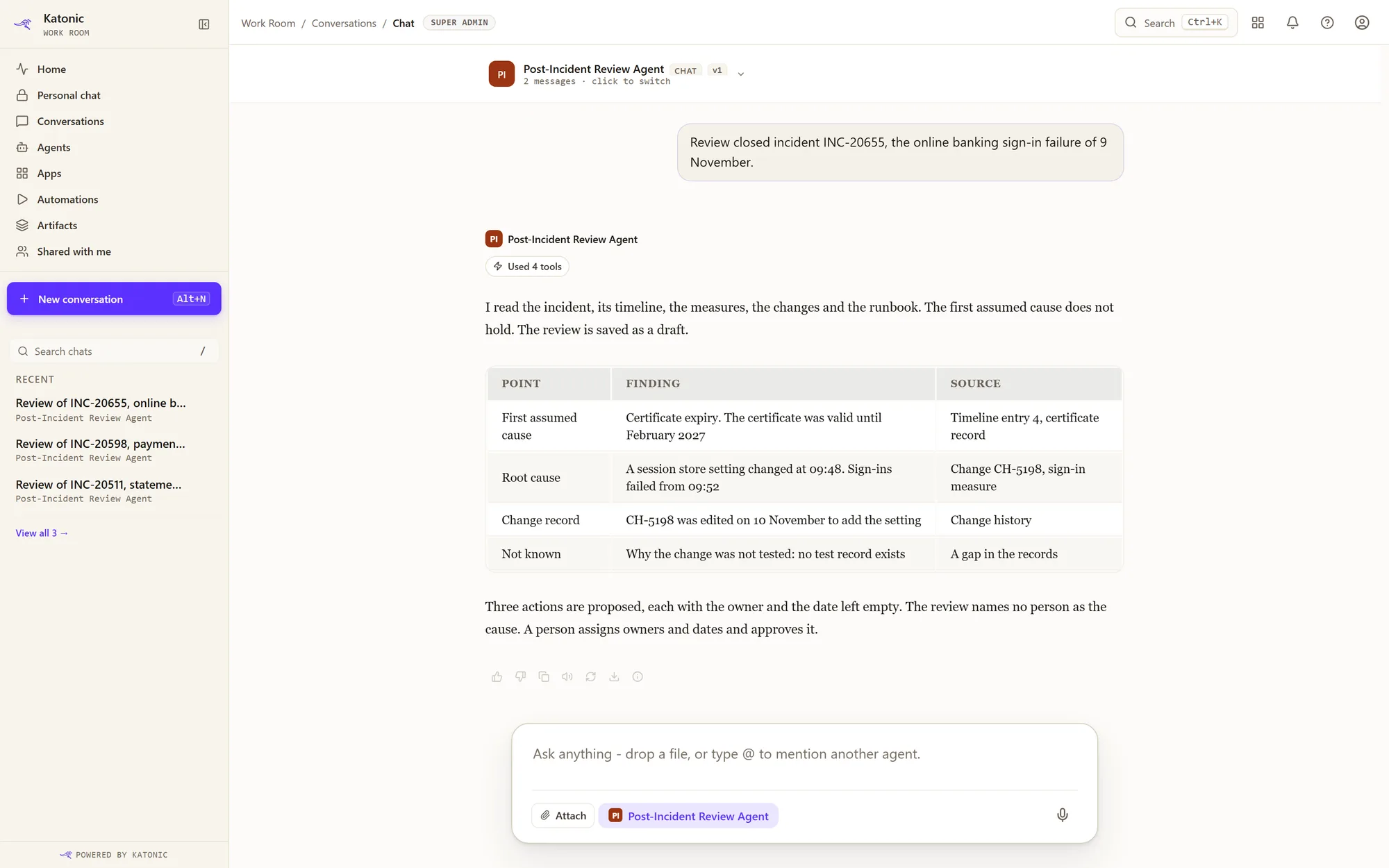
Tap the screen to open it at full size.
Reads from · connectors
 Your own APIs
Your IT operations system: the incident, metrics, changes and runbooks, through its own API.
Acts through · your own APIs
One operation that saves the draft review.
You give it a goal.
It plans its own steps.
Katonic calls this an autonomous agent.
01 · Where your people use it
In Work Room
Hand it the question in Work Room. It proposes a plan and waits for your approval, then works for some minutes and comes back with a report.
See Work Room →02 · Where they already work
In a screen they already use
Your developers can put it behind a screen your people already work in, so nobody has to open a new tool.
What you set up
- Import the IT operations system's API description.
- Agree the sections of your review.
- Run it on incidents you have already reviewed.
Where it runs
The agent, its knowledge store and the model run on infrastructure you own or control. You choose the model and serve it yourself, so questions, documents and answers are not sent to a public AI service. Incident records stay inside the bank.
How you get it today
You build it in Katonic Studio: describe the job, connect what is named above, add test cases and release the agent once it passes them. There is no ready-made template for this job yet.
Does it blame anyone?
No. It writes about steps, records, teams and systems, and names no person as the cause.
What if the records do not show the cause?
It lists the candidates, with what supports and what weighs against each, and says which record would settle it.
Does it assign the actions?
No. It proposes actions and leaves the owner and the date empty for a person to fill.