
Sanctions Alert Review Agent · Use case
How can a bank use an AI agent to review sanctions screening alerts on its own infrastructure?
A sanctions alert review agent takes a screening alert as it arrives. It sets the customer's record beside the watchlist entry field by field, marks each field as matching, partly matching or different, and recommends clear or escalate with its reasons. It saves a draft and closes no alert: a compliance officer decides every one.
Most alerts are false.
Each one is still read by hand.
- ✗ 01A name that resembles a list entry raises an alert, and an analyst compares date of birth, place of birth, nationality, identity number and address by hand before clearing it.
- ✗ 02The reasons for clearing an alert have to be on record, and customer data cannot be sent to a public AI service.
Where it stops for a person
Always. A compliance officer clears or escalates every alert.A compliance officer reads the comparison and clears or escalates. The agent does not close an alert, say that a customer is sanctioned, freeze anything or file a report.
It compares field by field.
A compliance officer decides.
Step · 01
A screening alert arrives. Your screening system announces it to the agent, or an analyst names it.
Step · 02
The agent reads the alert, the customer's fields, the list entry's fields and any earlier alert on the same pair.
Step · 03
It writes one row for each field, marked matches, partly matches, differs or not on the entry, with the reason and both record ids.
Step · 04
Where the entry holds too little to rule a match out, it says so and recommends escalation.
Step · 05
It saves the comparison as a draft and ends with one line: clear or escalate, and why. The compliance officer decides.
What a compliance officer sees
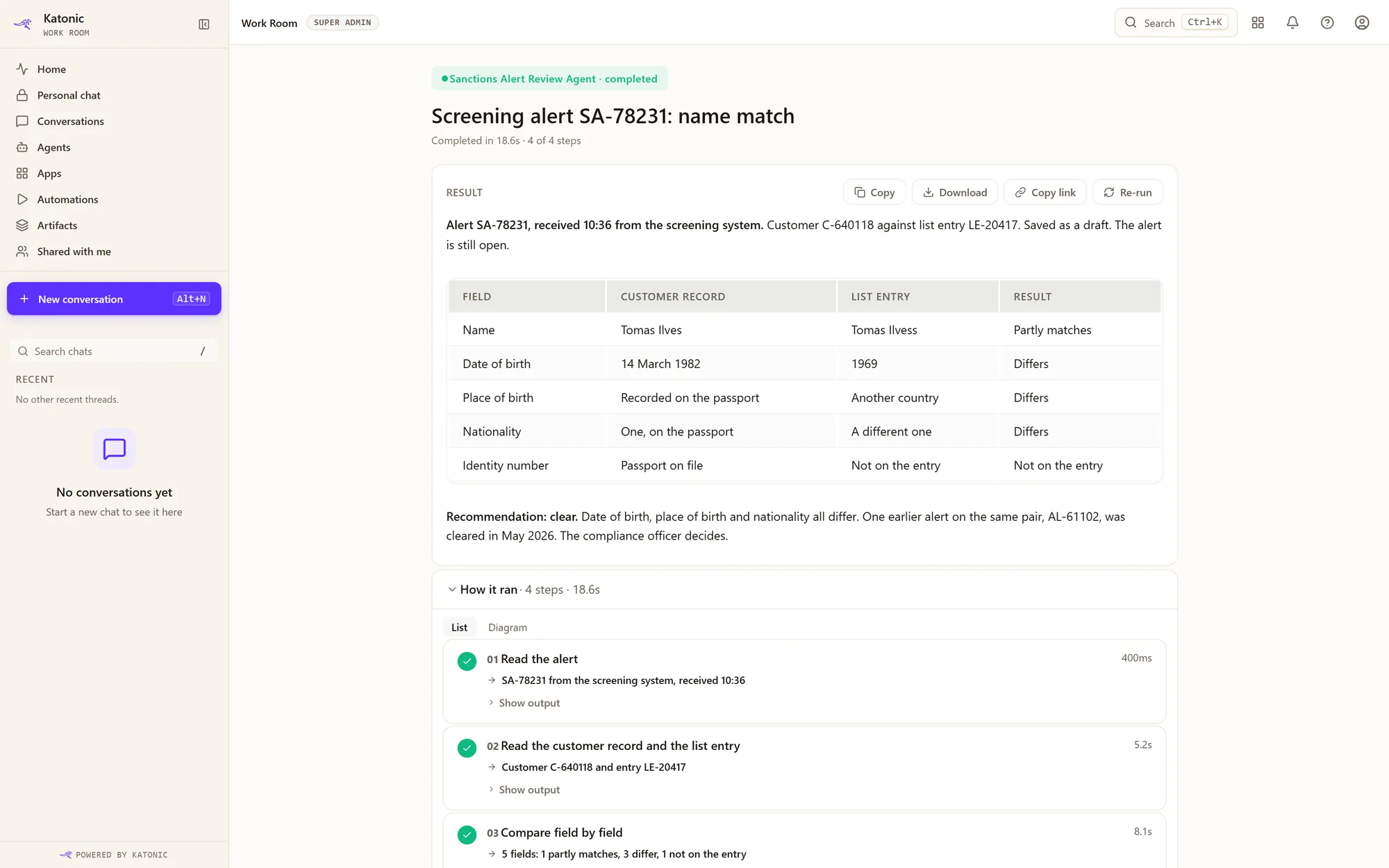
Tap the screen to open it at full size.
Reads from · connectors
 Your own APIs
Your screening system: the alert, the list entry and earlier alerts. Your customer records. Each through its own API: you give Katonic the API's OpenAPI description and each operation becomes a tool.
Acts through · your own APIs
One operation that saves the draft recommendation. No operation that closes an alert is given to the agent.
Nobody has to ask.
It starts when something arrives.
Katonic calls this an event-triggered agent, one kind of workflow agent: it starts when something happens in a system, such as an email arriving, a file landing or a record changing.
What is an event-triggered agent? →The four types of agent →
01 · How it starts
When something arrives
Another system tells it that something has happened, and it starts by itself. Nobody has to watch a queue.
02 · Where your people see it
In Work Room, under Automations
Each run appears in Work Room under Automations. A run that needs a decision waits there for a person.
See Work Room →03 · Where they already work
In a screen they already use
Your developers can put it behind a screen your people already work in, so nobody has to open a new tool.
For your IT team. Another system can start a run through the REST API or a webhook. An action that is held for approval still waits for a person, however the run was started.Public API →
What you set up
- Import the API descriptions of the screening system and the customer records.
- Give the agent the read operations and the one that saves a draft, and no others.
- Run it on alerts whose outcome you already know before anyone relies on it.
Where it runs
The agent, its knowledge store and the model run on infrastructure you own or control. You choose the model and serve it yourself, so questions, documents and answers are not sent to a public AI service. Customer records and list entries stay inside the bank.
How you get it today
You build it in Katonic Studio: describe the job, connect what is named above, add test cases and release the agent once it passes them. There is no ready-made template for this job yet.
Does the agent clear an alert?
No. It recommends clear or escalate and saves a draft. A compliance officer decides.
Does it use the match score?
No. It compares the fields themselves and does not treat the screening system's score as evidence.
What if the list entry is missing a field?
The field is marked as not on the entry. The agent does not fill the gap, and where too little is known to rule a match out it recommends escalation.